
Review - Metronome App - Pro Metronome for iOS
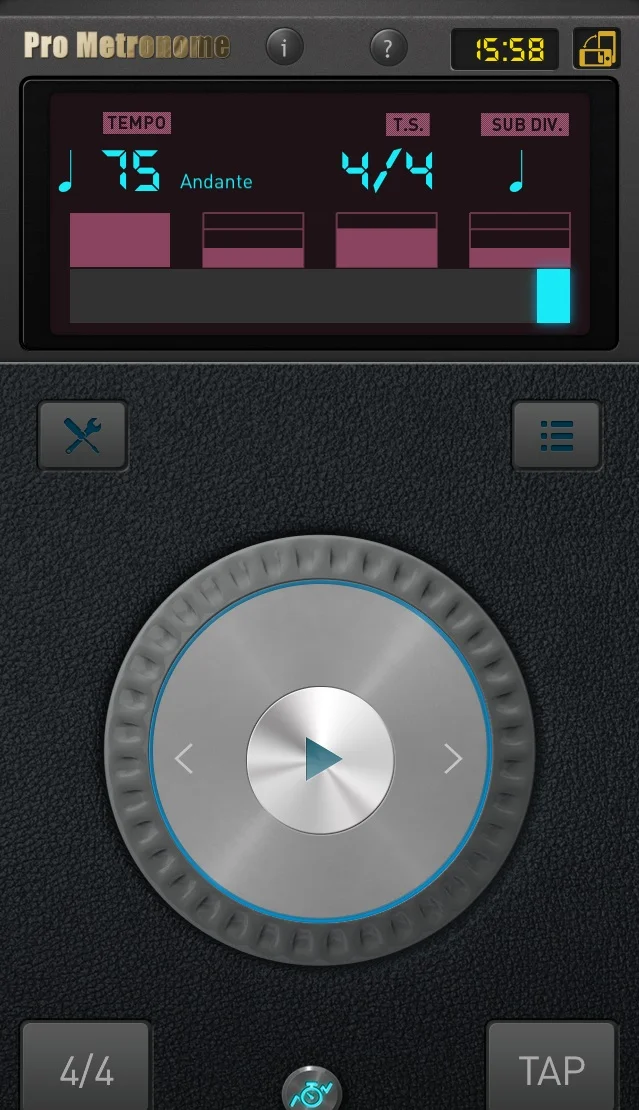
Given that I talk a lot about using a metronome I wanted to tell you about the Metronome App that I use: Pro Metronome by EUMLab
I have looked for other metronomes which can do everything I want, but I can't find one except for Pro Metronome.
So, given that I talk A LOT about using a metronome (often to the sound of student groans) I thought I ought to tell you about the Metronome App that I use: Pro Metronome by EUMLab
Midway through last year my ancient iPhone was dying a slow and painful death. I couldn't quite justify a whole new phone at the time, so I started looking for a metronome which could do everything I wanted it to do, basically what Pro Metronome does - I couldn't find one, at least not without costing me a fortune.Eventually I had to bite the bullet and got myself a shiny iPhone 6 SE - the first thing I installed was...Pro Metronome.
It has a fairly comprehensive set of basic features:
- 13 different sounds + mute/light only so chances are you'll find something you can works with.
- You can set the number of beats (1-16) and time signature (any note length from semibreve down to demi-semi quaver - whole notes to 32nd note)
-Each beat can be controlled individually with 3 levels of sound as a regular beat, sub accent or accent, you can also mute any beats.
- Alongside the beat display, there is a visual light display that can be customised in several ways , from only flashing on accented notes to flashing different colours on all the different levels of beat. Personally I prefer the pendulum mode as when I'm working with some tricky rhythms it gives me some visual anticipation for the next beat.
- Pro Metronome features an impressive speed range from 10-500bpm, combine that with the ability to mute beats and it's really gives a lot of scope to play around - super useful when your trying to work on your internal pulse.
The App has a number of paid add-on features, that you can buy as a bundle (NZ$6.99) but you can also purchase individually (from NZ$1.69), which I think is really good of EUM to do this as I don't necessarily want to pay for features I'm not going to use.
-Sub Divisions:
I use this all the time, as the name suggests, it lets you hear different subdivisions to the beat. There are up to 16 rhythmic variations to choose from, including off beats, syncopations and triplets.
I find this really useful for speed control, rhythmic accuracy and what I call cognitive confusion (I'm sure there's a proper term but I can't find it) where in order to play something straight and even, you practice against an alternative rhythm making it harder to play in time, so when you play again normally it feels easy.
You can also overlay a regular beat click using the accent levels. For example I might set the subdivision to offbeat semi-quavers and set an accent on just the first beat of the bar to keep my own internal beat in check.
With such a large number of combinations, there is something for every style.
-Practice Mode
Another useful paid feature I recently started using. I find it very useful for practising short exercises or passages that are easily repeatable.
I have been mostly using Automator - you can set the duration for each tempo by time or bars, then pick a start tempo and a target tempo and the increment which to increase each round. It then gives you an approximate time to complete. This is great to use as a warm up on a scale or short repeatable exercise, a bit like a musical beep test (but more satisfying and less competitive than the gym version). The only improvement I'd like to see here is that when you press start there be a count in. Using it for a continuous warm up activity, between pressing the start button and having my bow ready to play I miss the first couple of beats - but not a huge issue when I start slow and will be repeating it many times anyway.
The Warm Up setting is a bit more fiddly, for my purposes at least. Here you can set a tempo and then set multiple sections where you choose a multiplier for the tempo (faster or slower) and a time. Given that the things I play have a set number of bars, setting the time is not as useful. It does indicate how much time equals a bar at the given speed, but I found you still have to do a bit of maths so that rounding doesn't catch you out and you have to skip the last half beat of the bar.
It is still a very useful tool, and you do have a bit more control than automator to speed things up and slow down as you wish.
Other paid features are available like Polyrhythm, letting you play multiple rhythms simultaneously and Rhythm Trainer which mutes certain bars to train your internal pulse, but I haven't used these. There is also a tone generator, but I have a specialist Tuner app which I'm very happy with.
On the whole I find the app very user friendly and intuitive with swiping and tapping both getting you to the different menus. The tempo is easily controlled, with multiple manners to adjust it, including a TAP button. The display is clear and simple, and most importantly the sound is loud and clear. I would definitely recommend this app to anyone wanting to work a bit more seriously with the metronome.
You can download Pro Metronome from the App Store
For Android and iOS
If you found this post useful please click the like button below. If you have any questions or comments about this or any other metronomes do leave a comment underneath, I’d be happy to open up the conversation.
I do reviews for practice tools, concerts and other things from time to time, so subscribe to my feed to get the latest updates.
5 Things to do with a Metronome
For some, the metronome is the bane of their existence, something to be groaned at. But not me, for me it's one of the most useful tools I have for a good practice session. These are my top 5 creative uses to get the best out of that little ticking box.
For some, the metronome is the bane of their existence, something to be groaned at. But not me, for me it's one of the most useful tools I have for a good practice session. And particularly after attending a series of masterclasses at Waikato University where Richard Aaron from Juilliard was one of the visiting professors, he really reignited my creativity when it came to getting the best use out of that little ticking box.
Here is my top 5 ways to make the most out of your metronome.
5. A classic method of use, it's an oldie but a goodie. Setting the beat to a specific tempo that is required, so you know you are playing the piece at the right speed. In the case that the correct tempo cannot yet be achieved - set a slower tempo and gradually working it up. Gets the job done, simple as that.
4. Set the metronome to click on the smallest denomination. For most things semi-quavers should do the trick - but if the piece has demi-semi quavers for example you'd want to set it for that. This method forces you to subdivide accurately. It really helps suss out tricky rhythms, and to place notes well, for example with dotted rhythms, and even when there are a lot of longer notes , it's easy to get complacent and a bit elastic when it comes to changing notes - the metronome won't let you get away with it.
Having an internal pulse is super important and especially in orchestral playing, this is a great way to practice so it sets you up with solid subdivisions when it comes to following the conductor and keeping the section tight.
It's worth mentioning that this way of practice can be a little off putting at first, especiallly at quicker tempos (the metronome can turn into some sort of machine gun sound effect) but when you work up to it gradually, the subdivisions become more of a 'feeling' than hearing each and every click.
3. The metronome beats only on the first beat of the phrase. This will mean usually 4 bars, but depending on the music you could get away with 2, 3 or more. This is sort of an extension on number 4. It really tests your internal pulse and rhythm of the piece. Obviously the longer the phrases are the harder it is to land at the same time as the metronome. It helps identify phrases that might be dragging, or rushing. It also allows for some more musical shaping than the previous method, while still keeping a steady pulse. But be warned it sounds a lot easier than it is.
2. Set the metronome to alternative rhythms. I've been experimenting with this method since learning about finding and playing different jazz rhythmic feels. The main idea is to set some sort of irregular click going, something different to the main pulse and even sub-divisions, for example off beat quavers, a swung (tripletised) rhythm, a dotted rhythm or even something as simple as beat 2 and 4. In the first instance setting any alternative click to a piece will help solidify the rhythm, if for no other reason than it messes a bit with your head and you have to really concentrate on placing notes correctly.
More interesting though, is if you look really closely at the piece, where do the phrases lie, what is the rhythmic shape, what is the style and feel of the piece. Then choose a setting that fits into one of those elements.
I'll explain; for example if a piece makes a feature of triplets, setting a swung click will feed into those triplets and everything else will have to be carefully placed and fit into that same feel, unifying the whole theme, rather than the triplets sticking out.
Another example; a piece has a straight rhythm nothing unusual, but there are several semiquaver runs that start on the second half of the beat, stick on an off beat click, the runs will then start on a click, and everything else will move along with that same sort of syncopated feel.
Now these are just examples, and not everything will really work, but try some different things and you might find that some alternative rhythmic feel might inject a spark into the piece which is just what it needed.
1. Set the metronome clicks really really far apart. This one is taken directly from Richard Aaron's masterclass, and quite frankly it's genius, ever since, I have been using it often with many of my young students, his advice: to practice this regularly from an early age and it will develop a stellar internal pulse.
So the idea is to space out the clicks far apart, maybe 4 bars or more apart, then you listen to a couple, try and work out some subdivisions that work so you can clap on the next click - for most people, this is really hard. The trick is to keep a quick and steady internal pulse going in between each click keeping track of how many 'beats' or bars are in between. - Give it a go!
The students I've been doing this with haven't got it spot on yet, but they have improved dramatically at keeping a steady rhythm and following the beat in orchestra.
Remember - the metronome is your FRIEND. My advice would be to get a metronome that has many different functions, so you can set different rhythms, subdivisions and turn on and off beats and has the biggest range of speeds available.
A great app I use is Pro Metronome, has heaps of functions I need for free, and a heap more for purchase - the best thing, that you only purchase the bits you want, and not the ones you don't. Its available on the iTunes store and on Android.
And if you have any other nifty tricks you like to use , let me know in the comments section, I always love to learn new ways to make the most of my metronome!